Meta Title: Free Stencil Maker | Convert Photos to Printable Stencils Online Meta Description: Create custom stencils from photos, logos, and text with our Free Stencil Maker. Download as PNG, PDF, or SVG — perfect for Cricut, painting, and crafts.
Creating professional stencils used to be a time-consuming task. You had to trace images manually, clean up unwanted details, and often rely on expensive design software just to get a usable result. For many DIY enthusiasts, crafters, and Cricut users, the process often felt more complicated than the actual project itself.
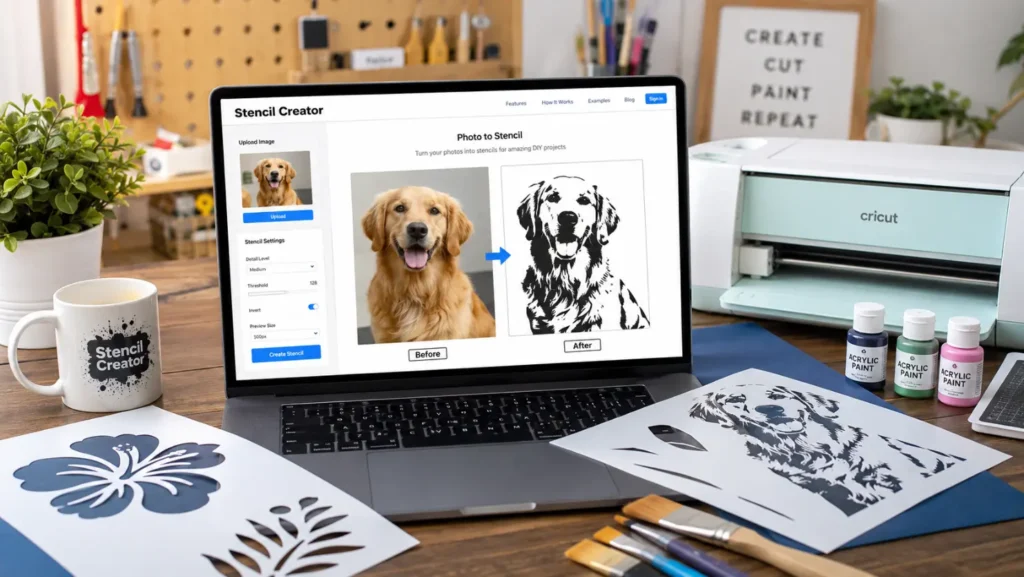
Fortunately, modern online tools have changed everything. With our Free Stencil Maker, you can transform photos, artwork, logos, and text into clean, print-ready stencil designs within minutes. Instead of spending hours editing images, simply upload a file, adjust a few settings, and download a stencil-ready design instantly — all directly in your browser, with no software installation required.
Why Use an Online Stencil Maker?
Many people still try to create stencils by hand, but a dedicated online stencil tool offers several advantages that save both time and effort.
Faster Than Manual Tracing
Traditional stencil-making involves drawing outlines by hand or using complex editing software. Our automated dual-engine processing analyzes your image and generates a clean stencil design in seconds.
Perfect for Cutting Machines
Many users create stencils for Cricut and Silhouette projects. Clean, high-contrast output makes it easy to use your stencil designs with cutting machines and craft plotters.
Printable and Digital Formats
Whether you need a printed template or a digital file, our tool lets you export your design as a high-resolution PNG or a print-ready PDF, ready for A4 printing.
Beginner-Friendly Workflow
No design experience needed. The interface is simple enough for beginners, yet flexible enough for experienced crafters who want full control over detail and contrast.
What Can You Make with a Stencil Design Tool?
One of the biggest benefits of a stencil generator is versatility — a single tool can support dozens of creative projects, including:
- Wall art and murals
- Furniture painting
- Home décor projects
- Wood signs
- Spray painting templates
- Vinyl cutting designs
- Scrapbooking
- Glass etching
- Custom gifts
- Cricut crafts
- Seasonal decorations
- School projects
Whether you’re working on a small hobby project or designing for clients, stencil-based artwork remains one of the most practical and rewarding crafting techniques available. Browse our Mehndi & Festive Stencils collection for seasonal inspiration.
How to Create a Stencil in Minutes Using Our Free Tool
Our Advanced Stencil Maker Pro makes the entire process fast and intuitive. Here’s how it works:
Step 1: Upload Your Source Image
Click “Upload Image” to load your photo in JPEG, PNG, or WebP format. Your image is processed locally in your browser using the HTML5 Canvas API — meaning 100% privacy, with nothing uploaded to any server.
Best results come from:
- Photographs with strong contrast
- Logos and clean line drawings
- Silhouettes and custom artwork
- Scanned sketches
Step 2: Balance the Dual-Engine Settings
Adjust the Subject Threshold (Sharpness) slider to isolate the primary edges of your subject. Standard tracing algorithms often lose fine details at higher thresholds — but our Background Detail Retention engine recovers faint lines and ambient details automatically, so your stencil stays accurate even with complex images.
Step 3: Review and Refine
Before exporting, check your preview for:
- Missing details
- Broken or disconnected shapes
- Unwanted background elements
- Very thin lines that may not cut or paint cleanly
Toggle Invert Stencil (B&W) depending on whether you need a carbon transfer trace or a dark etching mask.
Step 4: Export in Ultra HD
Activate Ultra HD Output Quality to render your design at up to 2400-pixel resolution while preserving the original aspect ratio — ideal for large wall stencils, tattoo transfers, and laser cutting templates.
Step 5: Download or Print
Choose your output:
- Save PNG — for digital use and printing
- Save PDF — A4-formatted, ready to print
- Print Stencil — send directly to your printer
How Our Stencil Maker Compares to Other Tools
Many basic online stencil generators rely on a single edge-detection pass — great for simple logos, but they often lose fine details or background elements when the contrast threshold is increased. This can leave you with broken outlines or missing sections, especially with portraits and busy images.
Our Advanced Stencil Maker Pro uses a dual-engine approach instead. While the Subject Engine sharpens the main outlines, the Background Detail Retention engine works in parallel to recover faint lines that a single-pass tool would normally discard. Combined with Ultra HD output (up to 2400px) and fully client-side processing for complete privacy, this gives you cleaner, more accurate stencils — without uploading your photos to any server or relying on a paid subscription.
Choosing the Right Photo for Better Results
Not every image converts equally well into a stencil. A few tips to get the best output:
Use High-Contrast Images — Photos with strong differences between light and dark areas convert into clearer stencil shapes. Portraits in good lighting work especially well.
Avoid Cluttered Backgrounds — Busy backgrounds create unnecessary lines. Crop your image or use the Background Detail Retention slider to manage this.
Use Sharp, Clear Photos — Blurry source images produce rough edges. The sharper your photo, the cleaner your final stencil.
Focus on Strong Shapes — Bold outlines and recognizable forms convert far more effectively than highly detailed photographs.
Creating Letter and Text Stencils
Text-based stencils are one of the most popular categories. Common uses include:
- Address numbers and house signs
- Workshop and storage labels
- Wall quotes and home décor lettering
- Business branding and logos
- Personalized craft projects
Custom lettering gives you complete creative control over names, phrases, and decorative text — perfect for personalized gifts and signage.
Converting Photos into Custom Artwork
Many users transform personal photographs into stencil-based art, including:
- Family portraits
- Pet photos
- Wedding images
- Sports photographs
- Travel memories
- Custom illustrations
By simplifying an image into clean, stencil-friendly shapes, you can create artwork that works beautifully on canvas, wood, fabric, and walls.
Using Stencils for Painting Projects
Stencils help create consistent designs while reducing mistakes and improving precision across many applications:
- Wall Painting — Transform plain walls into decorative focal points with large stencil designs.
- Furniture Makeovers — Give old furniture a fresh look with painted stencil patterns.
- Canvas Art — Many artists use stencil techniques to build layered, modern artwork.
- Decorative Signs — Wooden signs look more professional with stencil-applied lettering and graphics.
Multi-Layer Designs for Advanced Projects
Complex artwork often requires multiple colors and layers of detail. A layered stencil approach separates your design into multiple stencils — each one painted individually to build a finished piece with far more depth than a single-layer stencil could achieve.
Layered designs work especially well for:
- Portrait artwork
- Decorative signs
- Multi-color murals
- Advanced Cricut projects
- Professional craft displays
Tips for Creating Better Stencils
Keep Small Details Under Control — Very tiny details can disappear during cutting or become difficult to paint. Simplifying the design often produces cleaner, more durable results.
Think About Painting Before Designing — A design that looks good on screen may not translate well to paint. Always consider the final physical application.
Test Before Large Projects — Print or cut a small sample first to catch issues before committing materials.
Leave Enough Material Between Shapes — Extremely thin connections can tear during repeated use. Strong connections improve durability.
Use Bridges Correctly — Letters like A, B, D, O, P, and R contain enclosed spaces that need bridges to keep the stencil intact during cutting and painting.
Why DIY Crafters Love Online Stencil Tools
The popularity of online stencil makers continues to grow because they make creative projects more accessible to everyone. Instead of learning complex design software, you can focus on creativity and execution.
Key benefits include:
- Faster project preparation
- Consistent, repeatable results
- Easier customization
- Better compatibility with cutting machines
- Improved accuracy for painting projects
- Reduced overall design time
Frequently Asked Questions
Is the Free Stencil Maker suitable for beginners? Yes. The tool is designed for users of all skill levels and requires no technical or design experience.
Can I convert a photo into a stencil? Absolutely. Upload a photo, adjust the Subject Threshold and Background Detail Retention sliders, and generate a stencil-ready design in seconds.
Is my uploaded image sent to a server? No. The tool runs entirely in your browser using the HTML5 Canvas API. All processing happens locally on your device — your images are never uploaded anywhere.
Which file format should I choose? Use PNG for printing and digital sharing, or PDF for A4-ready printable templates. PNG files also work well as a base for converting to SVG in cutting software like Cricut Design Space.
Can I create custom text stencils? Yes. Upload an image of your text design, or create lettering artwork separately and run it through the tool to generate a clean stencil version.
What types of projects is this suitable for? Screen printing, tattoo transfer patterns, Cricut/Silhouette cutting traces, wood carving stencils, wall murals, and educational craft activities.
Start Creating Your Stencil Today
A free stencil maker is one of the easiest ways to transform images, artwork, and text into professional, ready-to-use stencil designs. Whether you’re a DIY crafter, artist, Cricut enthusiast, or complete beginner, you can generate clean stencil files in minutes — with full privacy, since everything happens locally in your browser.
👉 Try the Free Stencil Maker now and turn your next idea into a print-ready stencil design.
Reference resources: For more on stencil cutting workflows, see Cricut Design Space and general SVG file guidance from Mozilla MDN Web Docs.